Your debit card is linked to your current account, which lets you make various transactions: Withdrawing money from ATMs, making cashless payments in-store and shopping online. With George, you also have various features that can make everyday banking easier and safer.
Debit Card Features
Last Article Update 16.10.2026
There are a few ways to get to your debit card with George. We'll show you each one, and explain what you can do with your card.
App
From Overview

- From Overview, tap the card icon in the top right.
- Choose the card tied to the your current account.
- You can now see what's available to you under "Functions".
From your current account
Since your debit card is tied to a specific current account, you can also go to:
Overview > Current Account > Cards
Your debit card features
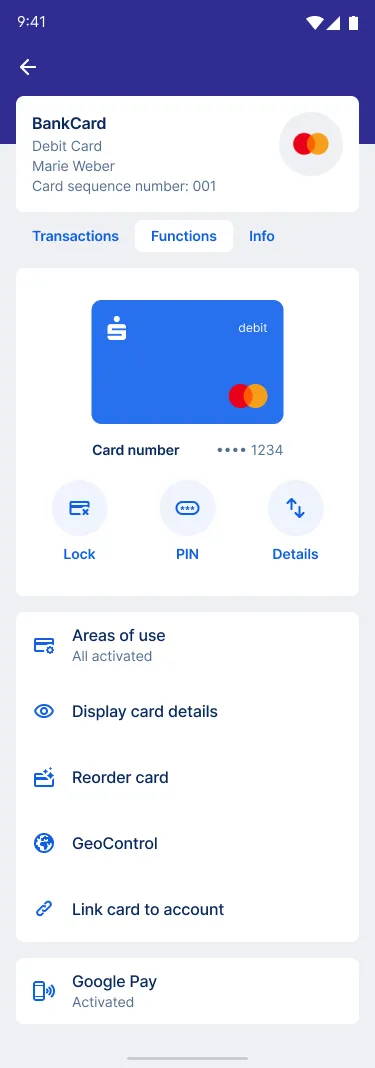
Functions and features include:
- Lock card: Lock your card if it is lost or stolen and reorder a new one straight away.
- Show PIN: Forgotten your PIN? No problem. George shows you the code right in the app. So nothing stands in the way of a purchase or cash withdrawal.
- Card limit: Change your current daily limit for cash withdrawals and card payments.
- Areas of use: Here you can see where your card is activated for use. For example, purchases in shops, online shopping, and cash withdrawals at ATMs. You can also make changes.
- Display card details: See your card number, expiry date and CVC (the 3-digit number you often need for online shopping).
- Reorder card: Card broken? You can order a new one here. George also shows you whether there are any costs involved.
- GeoControl: Your debit card is protected against fraud outside Europe by GeoControl. However, if you are travelling further afield, you can deactivate GeoControl so that you can use your card locally anywhere in the world.
- Link card to account: If you want to use your card for several accounts at the same time, you can link your card to up to 4 of your accounts here. You can then withdraw cash from your chosen account at any Erste Bank and Sparkasse ATM using just one card.
- Google Pay or Apple Pay: Activate your card and use your compatible device, such as smartwatch or phone, for contactless payments in shops, apps and online.
Web Browser
Know all the functions of your debit card? It's worth taking a closer look.
In George's web version, go to "Your Products" in the header and and select the debit card you want.
You can also get to your card by going to the current account tied to it. Choose "Cards" in the menu and find your card there.
You will find the following functions and features on your debit card
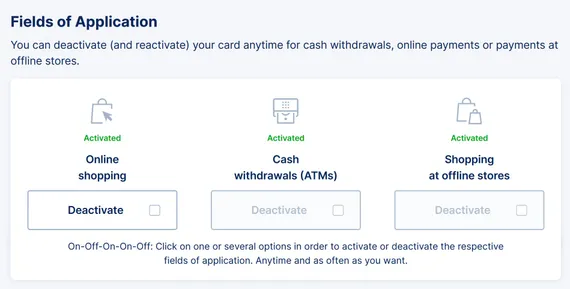
- Fields of application: You can see at a glance where you can use your card. Here you can also deactivate the card for online payments, for example.
- Card status: Lock your card if it has been lost or stolen. You can also order a new card right away.
- Your code (PIN): Have you forgotten your PIN? George can show you your code with just a few clicks. This function may be subject to charges and can be used up to 5 times a day.
- Other linked accounts: Here you can see all your accounts that are linked to the debit card. You can link up to four accounts to one debit card. This way you can choose which account you want to withdraw cash from at ATMs of Erste Bank and Sparkasse with only one card.
- GeoControl: The free Geo-Control function protects your debit card from misuse outside Europe. You can suspend this function, for example, if you are travelling worldwide and want to withdraw cash or pay with your card outside Europe.
Author: Tamara Berger-Feichter