Financial health with George FIT

Last Article Update 12.12.2025

With George FIT, you get insights on the 4 key pillars of your financial health: Budget (incoming money and spending), Reserves, Protection and Investments. George FIT gathers information on your current situation, considers your adjustments and gives you tips on how to improve your financial health and get fitter. Here's an overview of the most important settings and features of George FIT.

 

George FIT Übersicht George FIT Übersicht

George FIT settings

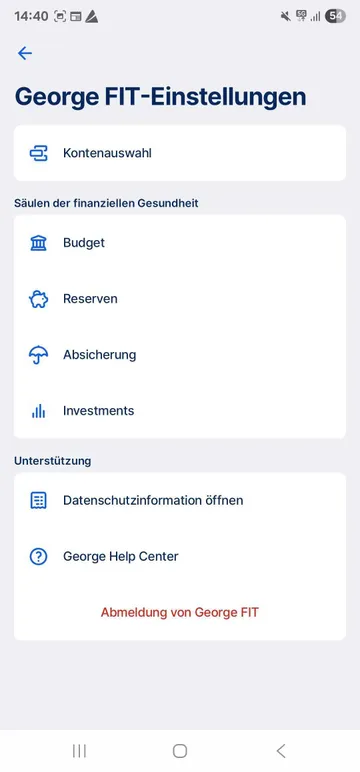
You can adjust settings right at the beginning - as well as make changes any time later. Just go to George FIT and tap the gear symbol in the top right.


George FIT Einstellungen George FIT Einstellungen

1. FIT account selection

First choose which accounts, cards, portfolios and (if available) other finance products that George should consider in his financial fitness analysis.

George FIT selects some options by default. You can adapt these, for example, if you want to exclude a shared or business account from your evaluation.

Please note that you need to choose at least one current account. Otherwise, George FIT cannot look at any incoming money or spending. If you have a credit card, we recommend selecting it as well. The same goes for savings accounts and/or investment portfolios. This makes George FIT be more precise and useful. 

2. Budget settings

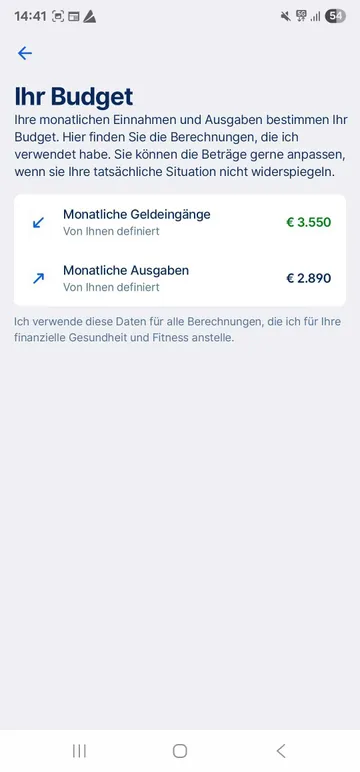
You'll see George's calculations for monthly average incoming money and spending in your budget settings. These are based on transactions for your chosen accounts and cards. George calculates the median value for the last 6 complete months.  

You can be the judge of how accurate George is - and of course make personal changes to incoming as well as spending. To do so, tap on the pre-calculated amount and enter an amount yourself. The more realistic, the better George FIT can help you. That's because George uses these amounts as reference values for all analyses and tips to improve your financial fitness. 

You can reset your budget settings back to the pre-calculated amounts (based on your transactions) any time. Tap once more on the mount and then the deactivated button, "based on your transactions".


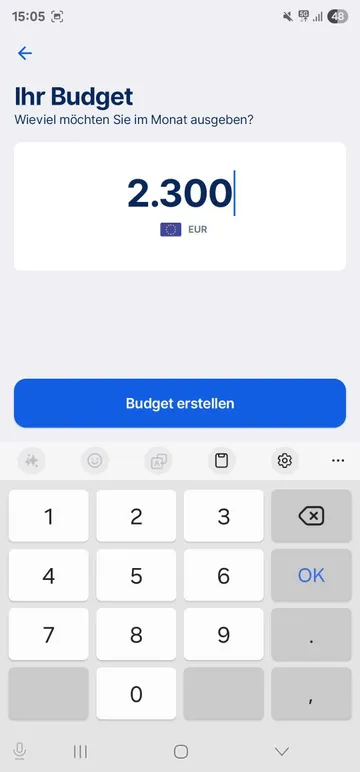
You can set your own spending budget right from the budget pillar in the George FIT overview. This lets you set a desired limit for monthly spending. More on that here

Last but not least: George also uses the values in the budget settings (including your self-set spending limit) for Spotlights - the at-a-glance view of your spending in the overview.


George Fit: Ausgabenbudget erstellen George Fit: Ausgabenbudget erstellen

3. Reserves Settings

As above, you'll first see the pre-defined values George uses. Your reserves are, basically, the total of your current account balance(s), savings account(s) and building savings. In other words, the money that's there for you in case of emergencies, rainy days, rocky patches... but also long planned goals and dreams. Since they include current accounts, your reserves may also go down if you go into overdraft.

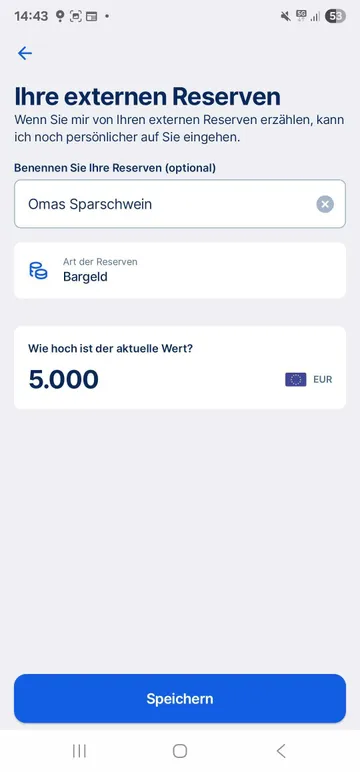
Have savings with other banks (or a piggy bank somewhere in a cupboard)? You can also add external reserves - George will count them toward your total reserves and consider them when giving tips for financial health. Just remember that he can't track what's going on with these external reserves - you can help him by keeping them up-to-date.


George FIT: Einstellungen zu Reserven. Externe Reserven hinzufügen George FIT: Einstellungen zu Reserven. Externe Reserven hinzufügen

4. Protection settings

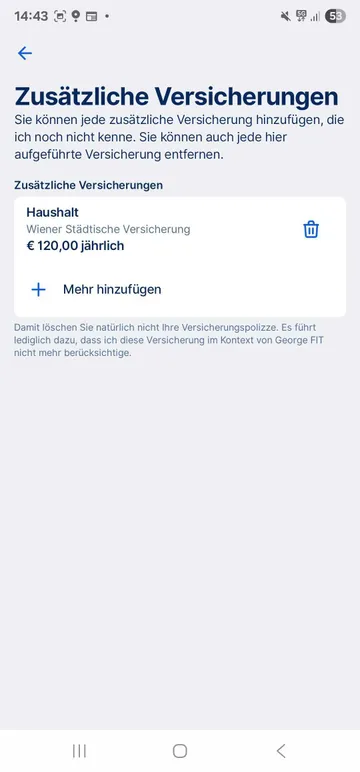
This covers insurances that serve as, well, insurance. Above "automatic prefill", you'll see what George has already found based on you transactions. Don't want George to consider these for George FIT? Just remove them from the list.

You can also add your existing insurances that George hasn't already recognised. You'll see the changes reflected in the "Protection" pillar in the main screen.


George FIT: Einstellungen zu Absicherung George FIT: Einstellungen zu Absicherung

5. Investment settings

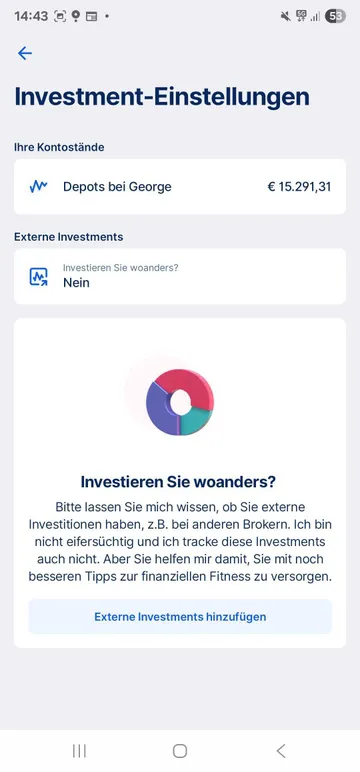
This covers your investments in portfolios managed by George, based on current market value. You can also add external investments, and - since George cannot track them - make sure they're up-to-date.

This helps George FIT get a more complete picture of your financial situation, and give you more personalised tips.


George FIT: Einstellungen zu Investments George FIT: Einstellungen zu Investments

6. Further settings and support

At the bottom of the George FIT settings, you'll see links to:

  • George FIT data privacy information: You should read these.
  • A link to the George Help Center (where you are now).

Finally, you can also opt out of George FIT. George will no longer use your data for FIT. You can, however, still come back any time. To start using FIT again, just tap FIT in the bottom navigation.  

Your financial health in the FIT overview

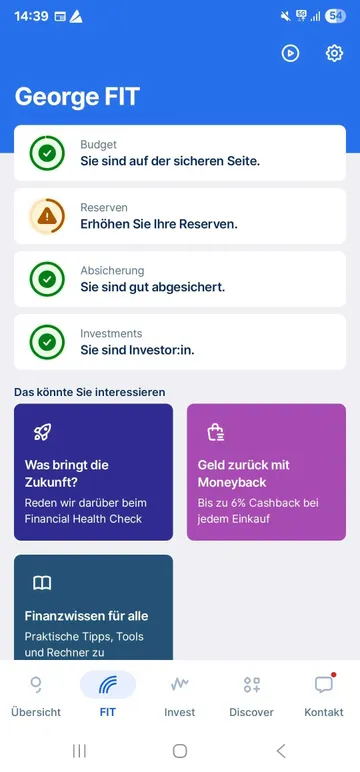
The first thing you see when you go to George FIT is your financial health overview, built on 4 pillars:

You can expect Pensions (Retirement) to join at some point in the future. 

George gives you a short but sharp look at your current financial health. Once you tap on any of the pillars, George takes you a page with more details and analysis.


George FIT Übersicht George FIT Übersicht

What does "financial health" actually mean?

Financial health is very important - when it's not there, it can be a quick road to money problems. Still, it's not that easy to pin down what it really means. Here's how Erste Bank und Sparkasse define it:


Financial health means you are able to cover your current and ongoing mandatory expenses, feel secure about your financial future and make decisions that allow you to enjoy your life.


This definition, of course, is also the foundation of George FIT.

Find out more information on the topic here

FIT in Detail: Budget

The FIT Budget pillar is all about incoming money and spending, as well as how these work together. You can also set a personal spending budget to give yourself more control.

1. Status and recommendation

George starts with a status and an assessment and recommendation based on your current situation, based on transaction data from chosen accounts and cards. He uses the monthly averages for incoming money and spending in the last 6 complete months. He also shows you a graphic to make things even clearer. 

You'll also find out how often you've kept within your personal spending budget in the past 6 months (assuming you set one up).


Find out more about what your budget status means here.

2. Spending analysis

This shows your actual total spending in the current month, including a visualisation. This lets you see certain things. For example, how close you get to your spending budget over the month. Or when you (potentially) go over it.

You can also find spending details for past months here. But keep in mind that the spending budget always refers to the current month - and not the one from that month, which may be higher or lower.

Under the graphic, George sorts your monthly spending by categories and, if desired, merchants. Tap on a list entry and you'll dive deeper into spending details. This way, you can also set up spending budgets for single categories.

At the very bottom you see the (very) helpful information on which transactions were NOT considered. As above, you can dig deeper for more details.

3. Set or edit budget

Last but not least, you can set or edit a monthly spending budget in the details page of your budget pillar. This applies for displays for George FIT as well as Spotlights in the overview. You'll also see it applied to past months. 

It's up to you how optimistic, realistic or strict you want to be with this budget. But in case it helps, the rule-of-thumb recommendation is a spending budget below 90% of your regular income. Explore more on the topic here

FIT in Detail: Reserves

In the George FIT Reserves pillar, George shows you a prsonal assessment and recommendation based on your account balances. This includes chosen current accounts as well as savings accounts and building savings - plus any external reserves, if you've added any. 

Money is personal and of course you're in charge. For that reason, George won't give you a fixed goal for reserves. Still, the common recommendation is to have reserves that amount to 3 to 5 times your monthly income(s). George FIT visualises this in a graphic. That lets you better see where you currently stand with your money reserves. This is also the basis for George FIT's assessments and recommendations. 


Find out more about the meaning of your Reserves status here.

FIT in Detail: Protection

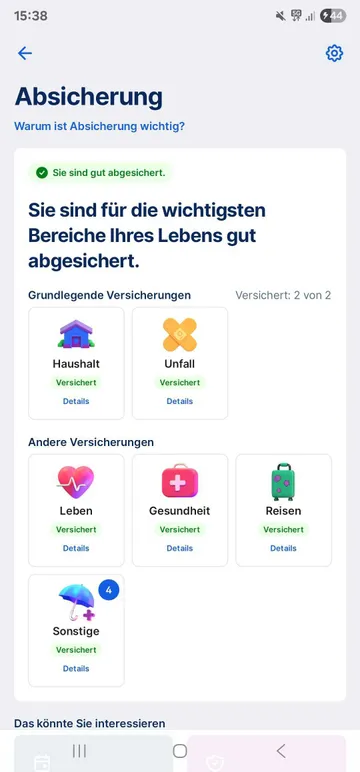
The FIT Protection pillar is all about insurance protection, which is crucial to protect you (financially at least) from harm.

George shows the insurances he's found based on your transactions, as well as insurances you've added yourself. George differentiates between basic insurances (e.g. household or accident insurance) and other insurances (e.g. private health insurance, life insurance). 

Depending on whether you have full, partial or no protection in basic areas, George provides assessments and tips for your financial health.

George FIT: Details Zur Absicherung George FIT: Details Zur Absicherung

FIT in Detail: Investments

The Investments pillar is about your securites. George FIT analyses your securities portfolios and shows you if and when you're ready to invest. For example, with regular investments. 

It's up to you if you want to invest, and how. Don't forget to consider that investments come with risks as well.

What's next for George FIT

Personal finances are complex and obviously include more than incoming money and spending, reserves, protection and investments. The next step in painting a more complete picture is the upcoming George FIT Pensions pillar. 

Until then, stay tuned, and stay FIT. And don't hesitate to talk to your advisor about your financial health.