Split The Bill

Last Article Update 15.05.2026

You're at a restaurant with friends and want to share the bill. You could go on a minutes-long marathon, starting with phone calculators, followed by confusion around how much to tip, ending with a long round of opening wallets, entering PINs and counting cash.


Or let George split the bill. And get paid by QR code.

 

For each completed debit or credit card payment, you can split the total into equal amounts. George then creates a QR code that others can use to pay you later. 

How to split a bill

1. From your overview, go to your current account (for debit card payments) or credit card.

2. Go to Transactions. 


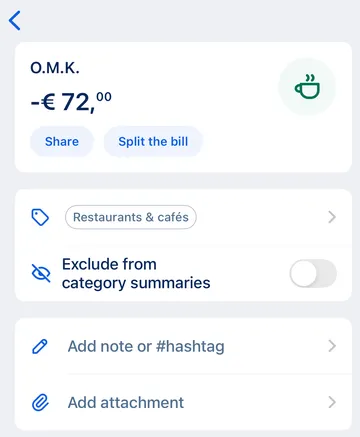
3. Find and the payment you want to split, then tap on it.


Split the bill - transaction Split the bill - transaction

4. Choose "Split the bill". 


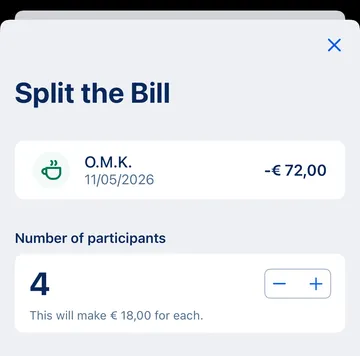
5. Select how many people (including you) will be paying. George shows the amount per participant.


How many participants How many participants

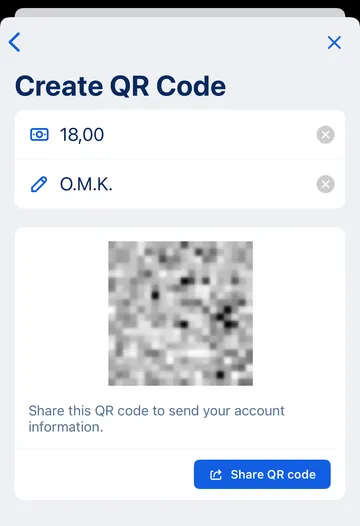
6. Tap "Create QR Code". George fills the transfer amount and message (merchant name). If you want, you can change these.


QR-code split bill QR-code split bill

7. Tap "Share QR code". Depending on your device, you will see different options. For example, sending as a message or saving it as an image. 

How others pay you

The sender can just scan the QR code with their banking app.


If they cannot do this, the image also includes the details they need to send you money: your IBAN and the transfer amount.


More on the topic: Requesting payments via QR code

A real-life example

Say you had lunch with 3 other colleagues. Everyone ordered the daily menu. You paid € 60. When splitting the bill, you enter 4 participants. George creates a QR code for a € 15 payment - an equal amount for everyone.