How to Find Help and Support on George Business

Last Article Update 27.11.2025

Wherever you are with George Business and whatever you're up to, help is just a click away. A click on the help icon, to be precise. 

 

Help and Support Icon at George Business Help and Support Icon at George Business

You'll find this icon - the large question mark - in the lower right corner of (most) George Business web screens. Just click on it to reveal the George Business Help Menu.

 

Support & feedback menu - collapsed Support & feedback menu - collapsed

George Business will show you the following options:
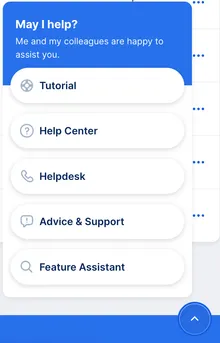
 

George Business Help Menu revealed - Tutorial, Help Center, Helpdesk, Advice, Feature Assistant George Business Help Menu revealed - Tutorial, Help Center, Helpdesk, Advice, Feature Assistant
  • George Business Tutorial: You can rewatch the George Business intro tutorial (the one shown during your first login to George Business) here.
  • George Business Help Centre: This is where you are right now - a place dedicated to better understanding George Business and his features. Fun fact: You can also find answers by directly searching for Help Center articles - just go to "Advice & Support" under Contact in the left-side navigation.
  • Contact the George Business Helpdesk: For all questions best answered by the support team. 
  • Feedback on George Business: With this interactive feature, you can tell George - using screenshots and a wide range of tools - what you like and where you want him to improve. Learn more here.
  • Open the Feature Assistant: Search and go directly to the most important, most-used George Business features.