In line with the EU Instant Payments Regulation (IPR), George Business is making some changes to SEPA transfers. Here’s an overview of what to expect, what to prepare for, and how this helps your business.

Last Article Update 10.10.2025
In line with the EU Instant Payments Regulation (IPR), George Business is making some changes to SEPA transfers. Here’s an overview of what to expect, what to prepare for, and how this helps your business.
From 09 October 2025, you'll notice some new features when you send Euros with a SEPA transfer - which includes all domestic transfers. SEPA stands for "Single Euro Payments Area". You can find a list of countries supporting SEPA transfers here.
What it is:
Before every SEPA transfer, George Business checks with the recipient bank if the recipient's IBAN & the recipient's name match. This is to make sure you’re sending money to the right account.
Why it helps:
The Verification of Payee service provides reassurance that your money is going where it should. It helps you catch small mistakes, like entering a valid IBAN that actually belongs to someone else. It also protects your business against fraud - for example, in case someone is using a fake company name. George can now check directly if an account really belongs to your intended recipient.
How it works:
When you enter the recipient details, George Business automatically checks with the recipient bank if name and IBAN match. George Business will notify you of the outcome with one of the following messages. Here's what to do in each case:
Name and IBAN match.
The IBAN is registered to the exact name you entered. No further action is required.

The IBAN is registered to ...
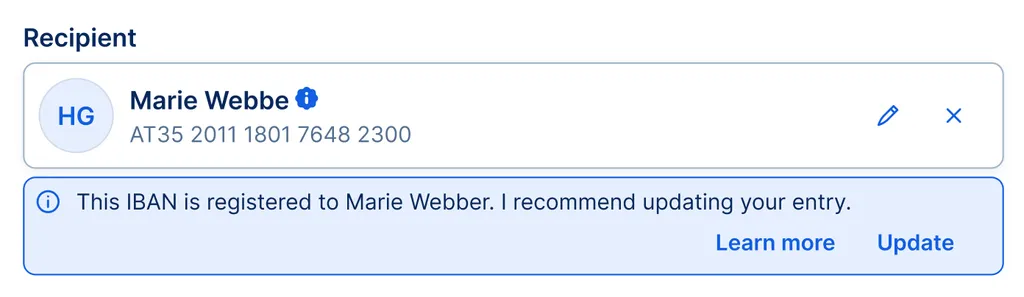
The name you entered almost matches the IBAN. You may get this result if you made a typo, e.g. "Weber Consul" instead of "Weber Consult", or if part of the name is missing, e.g. "D. Erik" instead of "Dag Erik". George will reveal the full name registered to the IBAN and recommend that you update your entry. If the recipient is saved under Contacts, George can also update your Address Book entry for you.
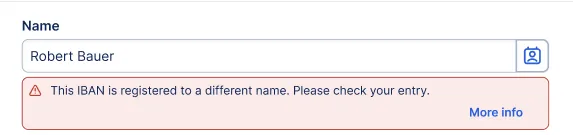
The IBAN is registered to a different name.
This is where you need to be extra careful. George will inform you that the name you entered does not match the name registered to the IBAN. It could be something harmless like the commercial name of a company (e.g. "Gruber Brew" instead of "Franz Gruber Coffee"), or, in the worst case, you are about to send money to the wrong account. Due to banking confidentiality regulations, George cannot reveal the name registered to the IBAN you entered. If you get this result, here is what you should do:
→ Check IBAN and name for errors and completeness.
→ Ask the recipient to confirm their details.
→ If something doesn't feel right, cancel the payment. The bank may not provide a refund if your transfer goes to the wrong account.
The recipient bank cannot check if name and IBAN match.
George checked with the recipient bank but they couldn't confirm the recipient's verification status. For the kind of transfer you’re making, the Verification of Payee service is not supported. This can happen for a few reasons:
→ The recipient bank is not registered for the verification service.
→ You're making a non-SEPA transfer, e.g. in a different currency, to/from a country outside the SEPA area.
Please double-check the recipient’s details manually.
Sorry, I cannot check if name and IBAN match.
You'd see this message if the Verification of Payee service is temporarily unavailable. This can happen for a few reasons:
→ The recipient account is closed.
→ You're sending money to a savings account (or another account not used for payments).
→ The verification service is temporarily down.
→ There’s a technical issue on the recipient bank's side.
Please try again later, or double-check the recipient’s details manually.

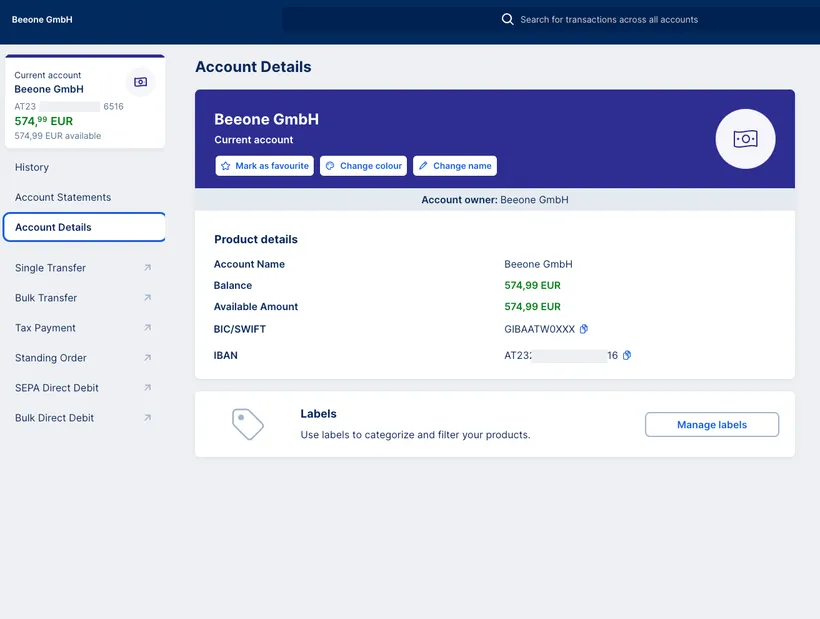
The Verification of Payee service also applies when you receive a euro transfer. To make sure that payments from customers and business partners arrive smoothly, it’s best to do a quick check: Do your invoices, payment instructions, QR codes, or website show your full account holder name? You can find your recipient name, as registered with the bank, in George Business under “Account details” → “Account owner”. Always give the sender your full recipient name as listed here.
The Verification of Payee service will also apply to SEPA transfers that are part of a bulk or data import. George Business will then show you a summary of the results.
However, as a George Business admin, you can opt out for bulk and data import transfers.
The automatic Verification of Payee will start in early October as part of the Instant Payment Regulation (IPR). From then on, every SEPA transfer will be checked. A warning does not always mean something is wrong with the transfer. However, it's recommended to check and - if needed - update the recipient details (Name & IBAN).
You can complete the transfer despite the warning if you're sure the IBAN belongs to the right person or business. To be safe, ask the recipient to confirm their details.
The new regulation also brings changes to Instant Payments (SEPA). Starting 09 October 2025, all Instant Payments (SEPA) are free of charge and unlimited by default - this replaces the previous 100,000 € limit.
What it is:
The highest amount you can send using Instant Payments (SEPA) from a single account. You will be able to set a different limit for each company account.
Why it helps:
Instant Payments (SEPA) are executed within seconds, which lets you stay flexible and decide exactly when your money lands in the recipient's account. A limit provides an added layer of protection. It can minimise loss in case of errors and let you control spending.
How it works:
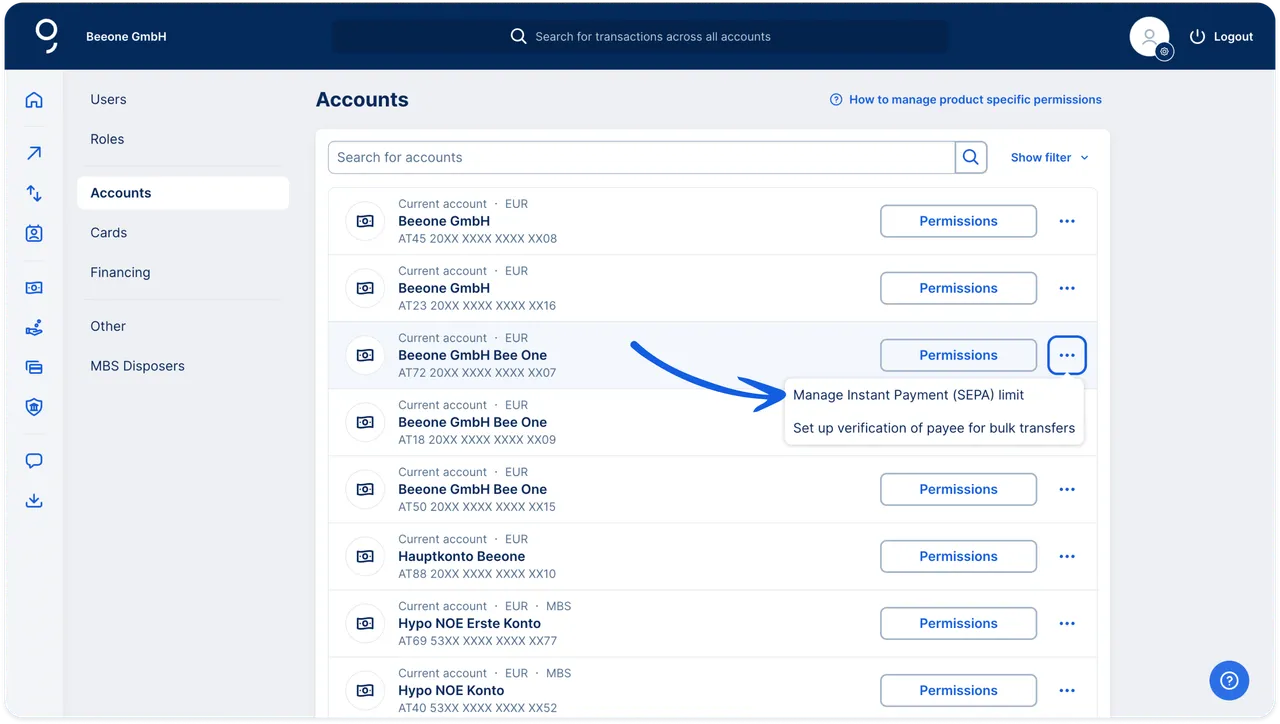
If you're a George Business admin, you can set a Instant Payment (SEPA) limit for each company current account. You can do so in the "Accounts" section under "Permissions". There are two limit types: per transfer, and per day. You can choose a different type for each account. The default is "Unlimited".
Authors: Rebecca Stoll & Charles Wagner