As a George Business admin, you can choose a login & signing method for each individual user. Let's look at your options and how to set them up.

Last Article Update 19.03.2026
As a George Business admin, you can choose a login & signing method for each individual user. Let's look at your options and how to set them up.
George Business lets you manage how each user gets access. It's easy, too. To get started:
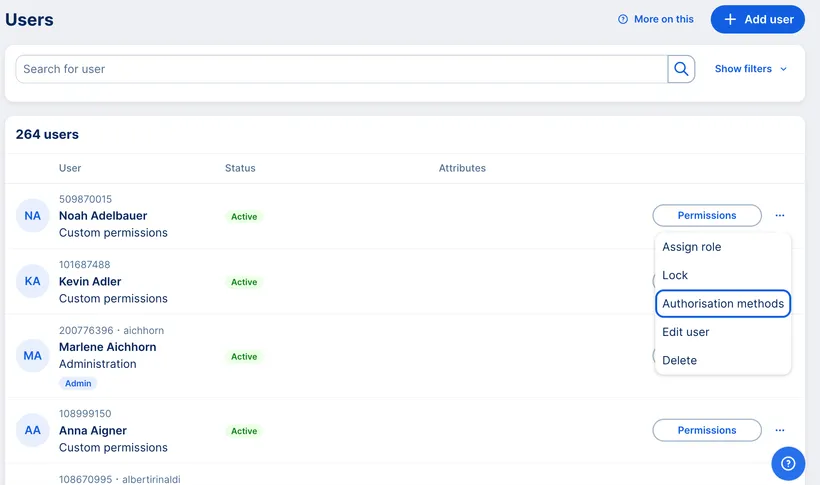
You can now choose the following options: George ID, s Identity, EB-PIN and CardTAN.
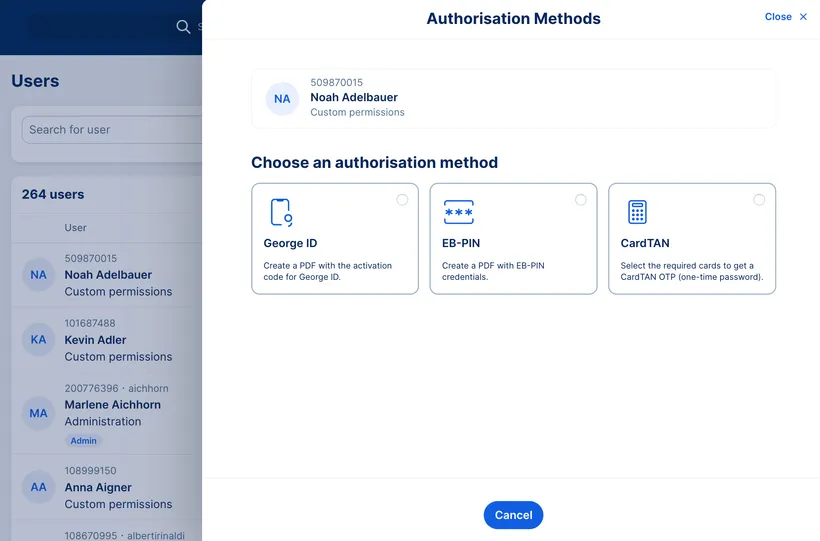
George ID is the authorisation method for the George Business app. The George Business app lets users log in, sign and perform tasks like creating transfers - in one place.
George ID and s Identity are both all-in-one methods for login and signing. They can't be used at the same time.
EB-PIN and cardTAN are for signing with specific cards. They can be used in addition to George ID or s Identity.
An EB-PIN (Electronic Banking PIN) is a 5-digit code. It's tied to a single disposer/user number and can be used for all cards activated for cardTAN.
With an EB-PIN, users can use their card to generate one-time passwords (OTP) with the TAN Generator. Find out more here.
Here you can choose which cards the user can use with cardTAN. That is, generate one-time passwords for signing.
All TAN-enabled cards are activated for new users by default. You can make changes any time you want.
s Identity lets users log in and sign with George Business, and available as a mobile and desktop app.
Our s Identity guide can help users get started.